Saturday, December 29, 2007

Leadership Qualities

This excellent list of leadership qualities is taken from the 'Aspiring Architects' webcast series by Mohammad Akif.

  • Ask thought-provoking questions that result in actionable technological patterns or solutions
  • Actively mentor others
  • Provide thought leadership by enabling others to see things from a different of better perspective
  • Influence decision makers
  • Champion structure, process, best practices and standards
  • Promote the capture and reuse of intellectual property
  • Effectively build individual partnerships and organizational networks

The valuable qualities below were also mentioned during the series. 

  • Practice diplomacy, negotiating and compromising
  • Manage and clarify expectations

Friday, December 28, 2007

The Winchester Mystery House

I've recently been investigating architecture, more specifically SOA and came across an Architecture Journal book entitled SOA in the Real World.  I'm unsure of the author but Chapter 1 is certainly an entertaining and informative read.  I was fascinated by the reference to the Winchester Mystery House and it's history formed the basis of a New Years message for my team.

The Winchester Mystery House is an intriguing tourist attraction in the USA near San Jose, CA. The Winchester Mystery House was the home to the heiress of the Winchester fortune (amassed from the sales of Winchester rifles). According to the legend, the heiress went to see a fortune teller and learned she was cursed to be haunted by the spirits of everyone ever killed by a Winchester rifle. The only way to avoid the curse was to build a mansion – as long as she kept building the spirits would leave her alone. She promptly hired 147 builders (and 0 architects), all of whom began working on the mansion simultaneously. The builders worked on the mansion until the heiress passed away, 38 years later. The result of their efforts is a classic example of implementation without architecture:

  • The mansion contains 160 rooms, 40 bedrooms, 6 kitchens, 2 basements and 950 doors
  • Of the 950 doors, 65 of them open to blank walls; 13 staircases were built and abandoned; and 24 skylights were installed into various floors.
  • No architectural blueprint for the mansion was ever created.

Confusing architecture with implementation generates chaotic and unpredictable results – much like the Winchester Mystery House.

Let's try not make the same mistake with software construction in 2008 ;)

Saturday, December 22, 2007

Favourite Archipedia Entries

Another Useless Acronym (AUA)
Another Useless Acronym (AUA) or what can happen when partially formed new architectural ideas emerge.

Automagically
When something has the capability to perform an indispensable task that no one thought was even possible.

Bottom Up Design
Bottom up design, as with its counterpart Top down design, are strategies of information processing.
In the Bottom up design approach, individual parts of a system are designed in detail and the design parts are then linked together to form larger components, which are then in turn linked until a complete system is formed. Often the bottom up approach assumes that all facts are known up front as the detailed parts are designed.

In the Top down design approach to modeling an overview of the system is made, without going into detail and each part of the system is then refined by designing it in more detail. Each new part may then can be refined again until the entire specification is detailed enough. Often the top down approach is used when not all facts or constraints are known about a design.

Choreography
Formally a choreography can be defined as a declaration of the activities within collaboration and the sequencing rules and dependencies between these activities.

Often these days, when people talk about the architecture of business services there are 2 related concepts which often come up - choreography and orchestration.

The difference between the two is easy to remember depending on your design perspective. Seen from a publicly observable view of a service, choreography is the description of how to interact with the service to consume its functionality. Seen from the same publicly observable viewpoint, orchestration is how service functionality is achieved ("within" a service) by aggregating some service logic and very possibly other Web services.

Cycles
Time, resource and effort that ought not to be wasted. "Let's not waste any cycles on something that doesn't matter."

A portion of one's capacity to perform work. "Do you have any cycles to burn on the ...".

Drinking from the Fire Hose
Having an overwhelming amount of information thrown at you, commonly at the start of a new job or project.

Ivory Tower Architecture
An architecture developed in isolation from the developers, or teams of developers, responsible for following it.

KISS
Keep It Simple Stupid is a design philosophy that states simplicity lasts and simplicty is needed to properly convey any ideas. Simplicity is the absence of unnecessary elements. Simplicity isn't a design style, but a perspective on design and an approach which often creates the most usable and beautiful results.


Low Hanging Fruit
Management expression for the most available and easy to accomplish objectives.

Operational Requirements
A category of requirements that describe the operational expectations for a system, such as availability, security, performance, scalability, manageability, interoperability, and reliability.

These requirements are distinct from the functional requirements that detail the business functions that the system performs (e.g., calculating the total bill for a shopping basket).

Also called "non-functional requirements"; also called "non-behavioral requirements". Closely related to the concepts "aspects" and "qualities".

Portfolio Management
Portfolio management is a function of IT Governance (which makes it fair game for enterprise architecture). The portfolios in question typically include both the application portfolio and the service portfolio. The focuses of portfolio management typically include:


  • Redundancy analysis -- avoiding having (and paying for and maintaining) multiple artifacts that perform essentially the same function;
  • Gap analysis -- identifying opportunities to improve processes through better automation;
    Manageability -- standardization of management interfaces, including vendor selection based on adherence to standard metaphors for management;
  • Cost rationalization -- analysis of the true ROI of automation and elimination of non-cost-effective systems;
  • Server consolidation -- reduction of the number of systems being supported, often by standardizing to a small set of server operating systems.

Project Stakeholder
Project stakeholders are any of the interested parties in a given development project. Typical examples of stakeholders include:

  • Business process owner -- the person responsible for the profit-and-loss of the business process being supported;
  • End user -- the people who will actually use the system under development;
  • Operations -- the people with the pagers whose sleep is at risk;
  • Executive sponsor -- the person who can light a fire under non-responsive stakeholders;

As well as architect, project management, developers, and testers, naturally.

Quality
The term "quality" is used in two distinct ways in systems architecture. The first usage is to define a class of common properties that must be addressd by any system. These "qualities" include:

  • Security
  • Manageability
  • Availability
  • Reliability
  • Scalability

These system qualities may be cross-cutting concerns for the system, and hence may be best addressed using some form of aspect-oriented programming.

The second usage is closer to the typical English-language usage: how well the system meets the requirements that were defined for it. For a more complete look at this meaning, please see quality management.

Rat Holing
A slang term for a discussion that spirals away from the topic of the meeting.

Return on Investment (ROI)
A calculation of the economic value being derived from a system as compared to its costs.
When embarking on a new initiative, it is common to predict an ROI for the system under consideration. This calculation needs to look at both development and ongoing operational costs for the system. The calculation is used as a justification for moving ahead with the project.
Once a system is in operation, ROI calculations ignore the "sunk costs" of development, and only compares the value being realized with the ongoing costs (which are more fully understood once the system is in operation than it was when the project was being envisioned). This calculation may, however, consider depreciation of assets that support the system, such as computers and storage devices.

Taxonomy
A taxonomy is a system of classification and with context, such as enterprise or folks or something else, a taxonomy is a description of the context.

Time-to-Value
Time-to-value is the elapsed time between the commitment to a project and the perceived realization of value from the investment. Project planners who stress short time-to-value seek to maintain excitement and emotional engagement around the project. Long lags between project inception and perceived first value can cause business process owners to disengage from and deprioritize the project.

Waterfall
Waterfall processes proceed through a unidirectional sequence of discreet steps.

The term is principally applied to a software development methodology that promotes a sequence along theses lines:

  • Conceptualization -- business process owners identify a business need and develop a conceptual model for a solution;
  • Requirements definition -- solutions architects work with business process owners to produce a detailed functional specification;
  • Project definition -- the functional specification is used to generate a set of work items for development;
  • Development -- Developers and test engineers produce and validate a set of deliverables in accordance with the project plan;
  • Acceptance testing -- the resulting system is tested for compliance with the functional requirements;
  • Deployment -- the system is put into production.

Critics of waterfall methodologies question how effectively the requirements for a software system can be understood "up front". They promote more agile approaches to software development.

Don Ferguson Quotes

"There is no point in building the Emerald City without building the Yellow Brick Road; and you have to build the road first."

"Vision without execution is hallucination."

Sunday, May 20, 2007

Location of Configuration File

If you're unsure where your .NET application is looking for it's config file, check the AppDomainSetup.ConfigurationFile property.

This property gets or sets the location and configuration filename for the running app domain.

AppDomain.CurrentDomain.SetupInformation.ConfigurationFile

Pretty unnecessary when you're writing sensible software, but when your dealing with "Notes + Javascript + ActiveX + .NET" lunacy you might just need this.

Thanks to Stonie for the pre-written post ;)

Friday, May 11, 2007

Utilise the Obsolete Attribute

Rather than just commenting out code that is deprecated, use the Obsolete Attribute to decorate types and members of types that are obsolete and will cause compiler warnings to be generated if that type or member is used. It’s a great way to make developers aware that a particular object is changing, and the functionality they are using will be disappearing in a future release.

Wednesday, May 02, 2007

List Running Web Applications

IISAPP.VBS

You can use the command-line script iisapp.vbs, which is stored in systemroot\system32, to view any worker processes that are currently running.

Tuesday, April 17, 2007

Command Prompt AutoComplete

From a command prompt pressing tab will auto complete a file name or folder. For example:

C:\>cd win (TAB) becomes cd windows
C:\WINDOWS>cd sys (TAB) becomes cd system32
C:\WINDOWS\SYSTEM32>cmd (TAB) becomes cmd.exe

Continuing to press tab cycles through all other files matching the pattern.

Long Running WebMethod

By default when you call a Web service method, the HTTP connection is held open until the WebMethod returns its value to the caller. In certain circumstances, where you may need to call a long running WebMethod where there is no return value it is appropriate to start the method processing and immediately return to the caller in a style similar to a "fire-and-forget" process.

By decorating the WebMethod with the attrbute [SoapDocumentMethod(OneWay=true)] , the server holds the HTTP connection open while it loads and parses the request message, but then returns immediately to the caller with an HTTP 202 response, indicating it has begun processing the request.

The disadvantage of this technique is that the consumer does not get any idea whether the method completed successfully or there were errors.

Note: By default, SOAP messages are in "document" style of formatting. If you are using Remote Procedure Call (RPC) formatting then use [SoapRpcMethod(OneWay=true)] instead of [SoapDocumentMethod(OneWay=true)].

Saturday, February 03, 2007

Delete All Files Using Powershell

Where have I been for the last two months? Looking after my first son, Andre Ashton, born on 30th December 2006. I have however, been doing a phenomenal amount of work on Movie Maker in Vista, it's too much fun! I also purchased a Seagate Barracuda 320Gb SATAII hard disk and a Vantec NexStar3 case with an eSata port. I attach the disk to my laptop with an eSata PCMCIA adapter and it really flies, three times as fast as USB.

Anyway, here's a PowerShell tip. To delete all files in a directory except those with a specific extension
, use the Remove-Item Cmdlet.

Remove-Item e:\video\* -recurse -force -exclude *.mpg

Sunday, December 10, 2006

Select ListControl Value

The SelectedValue property of a ListControl can be used to select an item in the list.  However, if no items in the list control contain the specified value, an ArgumentOutOfRangeException is thrown.  This exception can be avoided by using the IndexOf and FindByValue methods of the ListItemCollection.

control.SelectedIndex = control.Items.IndexOf(control.Items.FindByValue(value));

The IndexOf method returns -1 if the specified item is not found and null is returned by the FindByValue method.

Sunday, December 03, 2006

Add AutoCompleteExtender to ASP.NET AJAX Web Site

There are migration guides on the ASP.NET AJAX homepage detailing how to convert Web Sites originally coded against the Atlas CTP to ASP.NET AJAX 1.0 Beta2.  Unfortunately at this time, the AutoCompleteExtender is only included in the ASP.NET AJAX Futures November CTP but it's relatively straightforward to add the AutoCompleteExtender to an AJAX Web Site.

1. Add a reference to the Microsoft.Extensions.Preview assembly, usually located in C:\Program Files\Microsoft ASP.NET\ASP.NET 2.0 AJAX Extensions\v1.0.61025

2. Add the elements below to the configuration\system.web\pages\controls element of the web.config file.

<add tagPrefix="asp" namespace="Microsoft.Web.Preview.UI" assembly="Microsoft.Web.Preview"/>

<add tagPrefix="asp" namespace="Microsoft.Web.Preview.UI.Controls" assembly="Microsoft.Web.Preview"/>


3. Add the ScriptManager, TextBox and AutoCompleteExtender controls to the Web Form.


<form id="form1" runat="server">

  <asp:ScriptManager ID="ScriptManager1" runat="server" />

  <div>

    <asp:TextBox ID="txtCity" runat="server" />

    <asp:AutoCompleteExtender ID="autoCity" runat="server" CompletionSetCount="8" TargetControlID="txtCity" MinimumPrefixLength="1" ServiceMethod="GetCities" ServicePath="AutoCompleteService.asmx"/>

  </div>

</form>


4. Finally, add the Web Service that the AutoCompleteExtender will call, making sure that the Place code in seperate file checkbox is unchecked so the code is inline.  The WebMethod needs to accept the prefixText and count as parameters, returning the valid list as a string array.  Also note the inclusion of the Microsoft.Web.Script.Services.ScriptService attribute on the class definition.


<%@ WebService Language="C#" Class="AutoCompleteService" %>


using System;

using System.Collections;

using System.Web;

using System.Web.Services;

using System.Web.Services.Protocols;


[Microsoft.Web.Script.Services.ScriptService]

public class AutoCompleteService  : System.Web.Services.WebService {


    [WebMethod]

    public string[] GetCities(string prefixText, int count)

    {


        string[] autoCompleteWordList = { "Canberra", "Sydney", "Darwin", "Brisbane", "Adelaide", "Hobart", "Melbourne", "Perth" };

        Array.Sort(autoCompleteWordList, new CaseInsensitiveComparer());

        int index = Array.BinarySearch(autoCompleteWordList, prefixText, new CaseInsensitiveComparer());

        if (index < 0)

        {

            index = ~index;

        }


        int matchingCount;

        for (matchingCount = 0; matchingCount < count && index + matchingCount < autoCompleteWordList.Length; matchingCount++)

        {

            if (!autoCompleteWordList[index + matchingCount].StartsWith(prefixText, StringComparison.CurrentCultureIgnoreCase))

            {

                break;

            }

        }


        String[] returnCities = new string[matchingCount];

        if (matchingCount > 0)

        {

            Array.Copy(autoCompleteWordList, index, returnCities, 0, matchingCount);

        }

        return returnCities;

    }

}

Sunday, November 26, 2006

Software Estimation Tips

These tips are taken from Software Estimation – Demystifying the Black Art by Steve McConnell, published in the Microsoft Best Practices series.  This book has proved to be an invaluable resource and I recommend it to anyone responsible for providing software estimates, be they developer, team lead or project manager.  The tips listed are not exhaustive and should be considered in their original context.

Critical Estimation Concepts

  1. When you’re asked to provide an estimate, determine whether you’re supposed to be estimating or figuring out how to hit a target.
  2. A target is a description of a desirable business objective; a commitment is a promise to deliver defined functionality at a specific level of quality by a certain date. A commitment can be the same as the estimate, or it can be more aggressive or more conservative but do not assume that it is the same.
  3. Avoid using single point estimations, use ranges. Avoid using artificially narrow ranges so that you do not misrepresent the confidence in your estimates.
  4. Never intentionally underestimate. The penalty for underestimation is more severe than the penalty for over estimation. Address concerns about over estimation through planning and control, not by bias.
  5. Recognize a mismatch between a project’s business target and a project’s estimate for what it is: valuable risk information that the project might not be successful. Take corrective action as early as possible.
  6. Consider the effect of the Cone of Uncertainty on the accuracy of your estimate. Your estimate cannot have more accuracy than is possible at your project’s current position within the Cone. Use predefined ranges in your estimates.

    Cone of Uncertainty

  7. Include all necessary software development activities in your estimates, not just coding and testing. For example:
    i. Mentoring of new team members;
    ii. Deployment;
    iii. Requirements Clarification;
    iv. Technical Reviews;
    v. Performance Tuning;
    vi. Creation of Test Data.
  8. On projects that last longer than a few weeks, always include allowances for overhead activities such as vacations, sick days, training days and meetings.
  9. Never give an off-the-cuff estimate. Even a 15 minute estimate will be more accurate.
  10. Always document assumptions embedded in an estimate.
  11. Match the number of significant digits in your estimate (its precision) to your estimate’s accuracy. For example:
    i. “This Project will take 1 year” is not very precise but could be accurate.
    ii. “This Project will require 7,214 staff hours” is very precise but not accurate to the precision stated.
  12. Don’t assume that effort scales up linearly as project size does. Effort and communication paths scale up exponentially.

Fundamental Estimation Techniques

  1. Look for something you can count that is a meaningful measure of the scope of work in your environment.
  2. Collect historical data that allows you to compute an estimate from a count. Our organization’s past performance is the best indicator of future performance, industry data is not reliable.
  3. Collect a project’s historical data as soon as possible after the end of a project.
  4. At all costs, avoid using expert judgement to tweak an estimate that has been derived through computation.
  5. To create task level estimates, have the people who will actually do the work create the estimate.
  6. Create both Best Case and Worst Case estimates to stimulate the thinking about the full range of possible outcomes.
  7. Estimate new projects by comparing them to similar past projects, preferably decomposing the estimate into at least five pieces.
  8. Use T-Shirt sizing to help non technical stakeholders rule features in or out whilst the project. The first table can be used to calculate Net Business Value.

    Development Cost

    Business Value

    XL

    L

    M

    S

    XL

    0

    4

    6

    7

    L

    -4

    0

    2

    3

    M

    -6

    -2

    0

    1

    S

    -7

    -3

    -1

    0

    Feature

    Business Value

    Development Cost

    Net Business Value

    A

    XL

    M

    6

    B

    M

    M

    0

    C

    M

    S

    1

    D

    S

    L

    -3

    E

    S

    XL

    -7

  9. Have each team member estimate pieces of the project individually and then review estimates. Don’t just average estimates, arrive at a consensus that everybody is comfortable with.
  10. Use an estimation software tool to sanity check estimates created by manual methods. Do not treat the output of the tool as divine revelation. For pointers to estimation tools, see www.construx.com/estimate
  11. Focus on estimating size first. Then compute effort, schedule and cost from the size estimate.
  12. Re-estimate at each milestone. Base new estimates on the project’s actual progress, not on the project’s planned progress.
  13. Communicate your plan to re-estimate to project stakeholders in advance.

Estimation Scheduling Challenges

  1. Do not shorten a schedule estimate without increasing the effort estimate.
    i. Larger teams require more coordination and management overhead.
    ii. Larger teams introduce more communication paths which introduce more chances to miscommunication which introduces more errors.
    iii. Shorter schedules require more work to be done in parallel. The more work that overlaps, the higher than chance that one piece of work will be based on another defective piece of work increasing the need for rework.
  2. Reduce costs by lengthening the schedule and conducting the project with a smaller team.
  3. Consider the project’s development approach in allocating schedule to different activities.

Thursday, November 23, 2006

ASP.NET2.0 Page Life Cycle

Whilst investigating the ASP.NET AJAX Client Page LifeCycle in my previous post, I also revisted the server side ASP.NET Page LifeCycle.  The overview on MSDN is definitive but this splendid chart, courtesy of Leon Andrianarivony, deserves further propogation.

ASP.NET2.0 Page LifeCycle

Monday, November 20, 2006

Maintaining GridView Scroll Position in an ASP.NET AJAX UpdatePanel

Sometimes, it is inappropriate to use the paging feature of the ASP.NET GridView.  Instead, a scrolling grid is more applicable and enclosing the GridView in a <div> tag with the overflow style applied ensures that the over-sized element is clipped and that scroll bars are displayed.

<asp:UpdatePanel ID="updateGrid" runat="server" UpdateMode="Conditional">
    <ContentTemplate>
        <input type="hidden" id="hdnScrollTop" runat="server" value="0" />
        <div id="divScroll" style="width:350px;height:200px; overflow-x:hidden; overflow-y:scroll;" onscroll="$get('hdnScrollTop').value = this.scrollTop;">
            <asp:gridview id="grdOrders" runat="server" width="95%" datasourceid="objDataSource" cellpadding="3" GridLines
="Horizontal">
                <Columns
>
                    <asp:CommandField ShowSelectButton="True"
/>
                </Columns
>
            </asp:gridview>
  
        
</div
>
    </ContentTemplate
>
</
asp:UpdatePanel>

It is slightly more complex to persist the scroll position during an syschronous postback using ASP.NET AJAX.  It's necessary to store the scrollTop property of the div tag in a hidden field using the client side onscroll event.  Note the use of the Sys.UI.DomElement $get method, which is a shortcut to the getElementById method. It's also important that the hidden input element has the runat="server" attribute so the element can be accessed during the pageLoaded function.

<asp:ScriptManager ID="scriptManager" runat="server" EnablePartialRendering="True" />
<
script type="text/javascript" language
="javascript">
    var prm = Sys.WebForms.PageRequestManager.getInstance();
    prm.add_pageLoaded(pageLoaded);
    prm.add_beginRequest(beginRequest);
   
var postbackElement;

    function beginRequest(sender, args) {
        postbackElement = args.get_postBackElement();
    }

    
function
pageLoaded(sender, args) {
        
var
updatedPanels = args.get_panelsUpdated();
        
if (typeof(postbackElement) == "undefined"
) {
            
return
;
        }
        
if (postbackElement.id.toLowerCase().indexOf('grdorders'
) > -1) {
            $get("divScroll").scrollTop = $get("hdnScrollTop").value;

        }
     }
</script>

In order that the scroll position of the div can be reset after a postback, it is first necessary to add a reference to the PageRequestManager.  To use the PageRequestManager class in client script, you must first have a ScriptManager server control on the page. To access the PageRequestManager class, you must have the EnablePartialRendering set to true (the default) on the ScriptManager control. When EnablePartialRendering is set to true, the MicrosoftAjaxWebForms.js file that contains the PageRequestManager class is included as a script resource for the page.  Once you have the current instance of the PageRequestManager, you can access all of its methods, properties, and events such as beginRequest and pageLoaded.

The beginRequest event is raised before the processing of an asynchronous postback begins and the postback is sent to the server.  Here we get a reference to the element that has raised the postback. 

The pageLoaded event is raised after all content on the page is refreshed.  The function initially determines if the page has been posted back by checking the typeof the postbackElement.  If the postback was raised by a our GridView, the scrollTop property of our div tag is set to the value stored in the hidden field.

Client Page Life-cycle Events are also integral to Customizing Error Handling in Partial-Page Updates.

Thursday, November 16, 2006

ASP.NET Panel GroupingText Property

I discovered the GroupingText property of the ASP.NET2.0 Panel control today.  When the property is set, the control actually renders a <fieldset> tag to group child form elements together with a caption and a smooth cornered border. The caption itself is created using the <legend> tag.  The browser is responsible for the appearance of the caption and labels I think it looks really neat in IE7.


Tuesday, November 14, 2006

WCF Contracts Defined

A WCF service publishes the operations that it supports by using a service contract. This contract defines the operations that the service provides, without specifying how the operations should be implemented.

Operations are defined by adding methods to a Service Contract interface that is annotated with the OperationContract attribute. Only methods that are qualified by the OperationContract attribute are service operations, and can be exposed to clients.


[ServiceContract]
public interface IOrderService {
  [OperationContract]
  void CreateOrder(int orderNumber);
  [OperationContract]
  void AddItemToOrder(int orderNumber, Item itm);
  [OperationContract]
  Order GetOrderDetails(int orderNumber);
}


A WCF service is implemented by creating a class that implements the service interface.


public class OrderService : IOrderService {
  void CreateOrder(int orderNumber) {
    // implementation details
  }
  void AddItemToOrder(int orderNumber, Item itm) {
    // implementation details
  }
  Order GetOrderDetails(int orderNumber) {
    // implementation details
  }
}


Data contracts define how complex types are serialized when they are used in WCF service operations. They defined by applying the DataContract attribute to a class, and then adding DataMember attributes to fields and properties to show which members are to be exposed to clients.


[DataContract]
public class Order {
  [DataMember]
  public int OrderNumber;
  [DataMember]
  public String ClientName;
  ...
}


Message contracts describe the entire SOAP message format. They can use data contracts and serializable types to emit schema for complex types, and they also make it possible to control the SOAP message headers and body explicitly, by using a single type. Message contracts provide a simple method to add custom SOAP headers to incoming and outgoing messages.


[MessageContract]
public class MyRequest {
  [MessageHeader]
  public string field1;
  [MessageBody]
  public string field2;
}


A WCF service reports errors by using Fault objects. Fault contracts document the errors that WCF code is likely to produce, and WCF maps Fault objects to SOAP faults. Note that the type specified in the FaultContract does not have to be an exception.


[OperationContract]
[FaultContract(typeof(DivideByZeroException))]
void SomeMethod();


A Fault is generated by throwing a FaultException:


throw new FaultException(someException);

Thursday, November 09, 2006

Share Common Files in Visual Studio

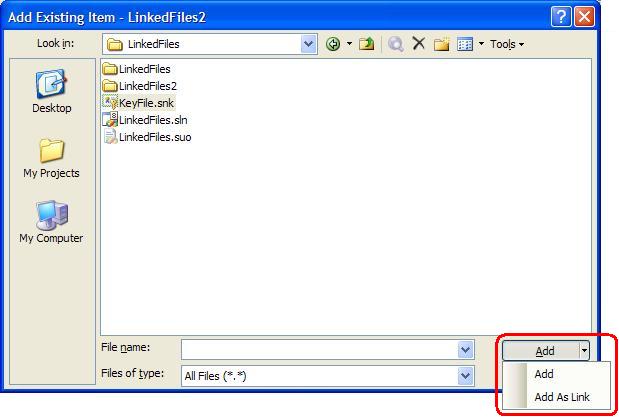
Under normal circumstances, when you add an existing file to a project, Visual Studio makes a copy of the file, local to the project. This is good for isolating breaking changes, but not so good if you want to share a single copy of a file.

An alternative is to share common files, perhaps containing assembly info or a strong name key, that need to be referenced throughout your code base. To link files across projects by using the Add As Link context menu in the Add Existing Item dialog.

Once added, the linked file can be identified in Solution Explorer by the shortcut symbol at the foot of it's icon. The major benefit is that any changes saved to either the original or any linked file are replicated across the original and all linked files immediately.

Wednesday, November 08, 2006

Create a new GUID in SQL Server

To create a new uniqueidentifier or GUID (Globally Unique Identifier) in SQL Server use the newid() function:

select newid()

This function can be useful for creating test data but there is another use. It's also possible to select a random record using the script below:

select top 1 *
from dbo.Customer
order by newid()


I can't really think of any situation where this randomisation technique would have been helpful but, you never know !

Sunday, November 05, 2006

Command Prompt Previous Command List

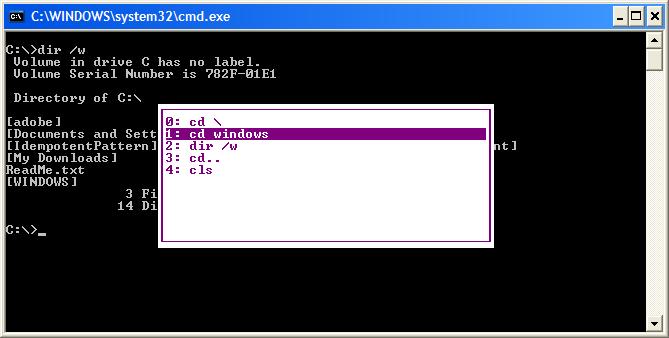
This Command Prompt functionality has been around since Windows 2k and it's still available in Vista. I don't believe it's particularly well known and can be useful. Rather than just cycling through previous commands using the cursor keys, a list of the previous commands can be recalled by pressing F7. Select the required command using the cursor keys and hit enter to execute.

Command Prompt Command List