IISAPP.VBS
You can use the command-line script iisapp.vbs, which is stored in systemroot\system32, to view any worker processes that are currently running.
IISAPP.VBS
You can use the command-line script iisapp.vbs, which is stored in systemroot\system32, to view any worker processes that are currently running.
In my previous post, I talked about an IIS issue when using integrated authentication and a custom service account that does not have a service principal name. The problem took some time to diagnose and solve, and it was only later that the Authentication and Access Control Diagnostics tool came to my attention. I replicated the original issue and ran the tool with some very positive results.
Diagnosis with the Check Authentication task, clearly indicates that the custom identity of the application pool under which the virtual directory is running, does not have a service principle name and Kerberos authentication will fail -
Once Kerberos authentication is disabled, only NTLM is available. Rerunning the Check Authentication task results in the warning below -
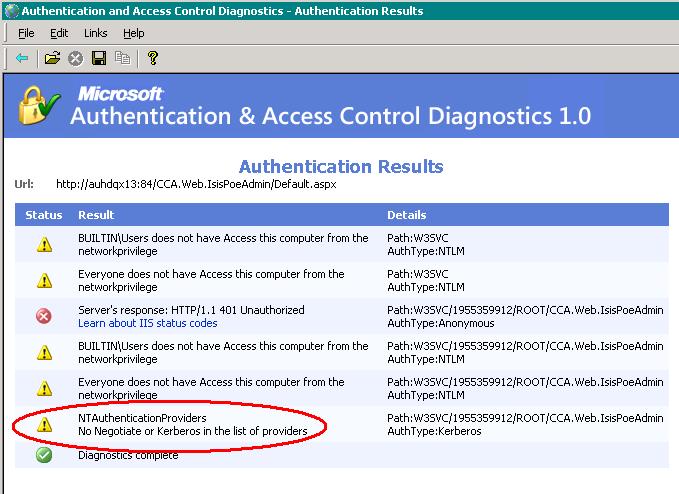
I think this is a great tool, and one that will save my team a great deal of time in future.
There's a great MSDN article, with step by step instructions on how to set up a service account for an ASP.NET 2.0 application should you not want to user the Network Service account.
Once a user account has been created, assign ASP.NET permissions to the new account by running the command below from the framework prompt.
aspnet_regiis -ga MachineName\AccountName
Where MachineName is the name of your server or the domain name if you are using a domain account, and AccountName is the name of your custom account. When you run aspnet_regiis.exe with the -ga switch, the command grants the following rights to the account:
If your account does not have a service principal name and for some time, your web site will require authentication and user's will be prompted for a user name and password but even valid credential will not be authenticated. Should you be unable to create a service principle name, another MSDN article, How to configure IIS to support both the Kerberos protocol and the NTLM protocol for network authentication, details how to enable/disable Kerberos authentication.
IIS passes the Negotiate security header when Integrated Windows authentication is used to authenticate client requests. The Negotiate security header lets clients select between Kerberos authentication and NTLM authentication.
1. the following command, usually located in C:\Inetpub\Adminscripts to retrieve the current values for the NTAuthenticationProviders metabase property:
cscript adsutil.vbs get w3svc/WebSite/root/NTAuthenticationProviders
In this command, WebSite is a placeholder for the Web site ID number. The Web site ID number of the default Web site is 1.
This command fails if the NTAuthenticationProviders metabase property is not defined. If the Negotiate process is enabled, this command returns the following information:
NTAuthenticationProviders : (STRING) "Negotiate,NTLM"
2. If the command in step 1 does not return the string "Negotiate,NTLM," use the following command to disable the Negotiate process:
cscript adsutil.vbs set w3svc/WebSite/root/NTAuthenticationProviders "NTLM"
Repeat step 1 to verify that the Negotiate process has been disabled.
Next week, I'm going to look into how the Microsoft Authentication and Access Control Diagnostics 1.0 Tool could have helped solve this problem.
Countless times, the .NET exception, The request failed with HTTP status 401: Access Denied dumbfounds developers. To determine under what user is trying to access a resource extend the default logging available in Internet Information Services (IIS).


Once the User Name is checked, the the windows user who is accessing the resource will be logged as below.
02:40:00 127.0.0.1 domain\username W3SVC1 AUHDQL99 POST /TestAuthentication/Default.aspx 500


